 OutPumper
Cold email, from inside Outlook
Cold email from a couple of real Outlook mailboxes.
OutPumper runs inside Outlook and sends through your own Microsoft 365 mailboxes.
- No buying 30 to 50 domains
- No spinning up hundreds of mailboxes
- No weeks of warmup, the very pattern Google, Yahoo and Microsoft now flag
- You inherit Microsoft's deliverability instead of fighting for your own
Works with the infrastructure you already pay for
Every other tool
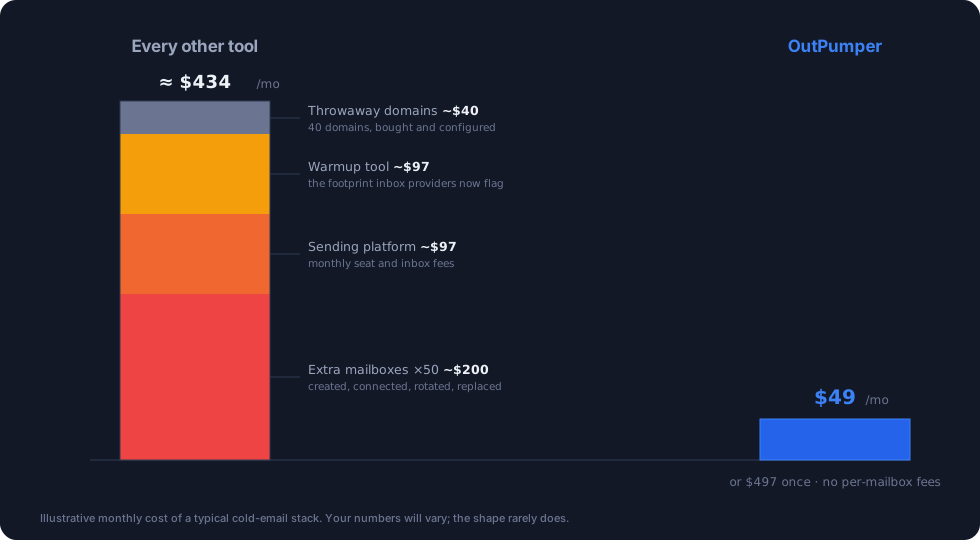
- Buy and configure 30 to 50 throwaway domains
- Create, connect and rotate hundreds of mailboxes
- Two to three weeks of warmup before you send a thing
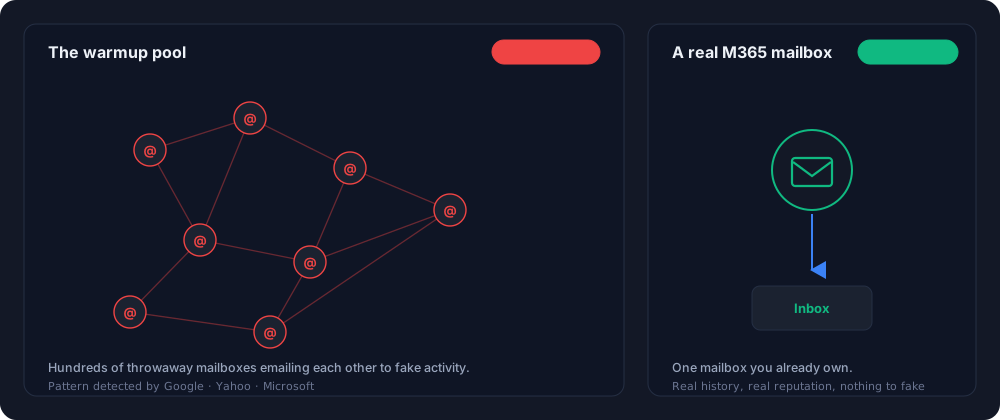
- Warmup pools leave a footprint Google, Yahoo and Microsoft now flag
- Monthly fees that climb with every mailbox and seat
- Your contacts and sending sit on their platform
OutPumper
- A couple of real Microsoft 365 Outlook mailboxes, that is all
- No domain farm to buy, no mailbox sprawl to manage
- Send on day one, nothing to warm up
- You ride Microsoft 365's established sending reputation
- One predictable cost, Lifetime option, no per-mailbox fees
- Your contacts and sending stay in your Microsoft 365 tenant
Inside your inbox
The whole engine, in the Outlook you already use.
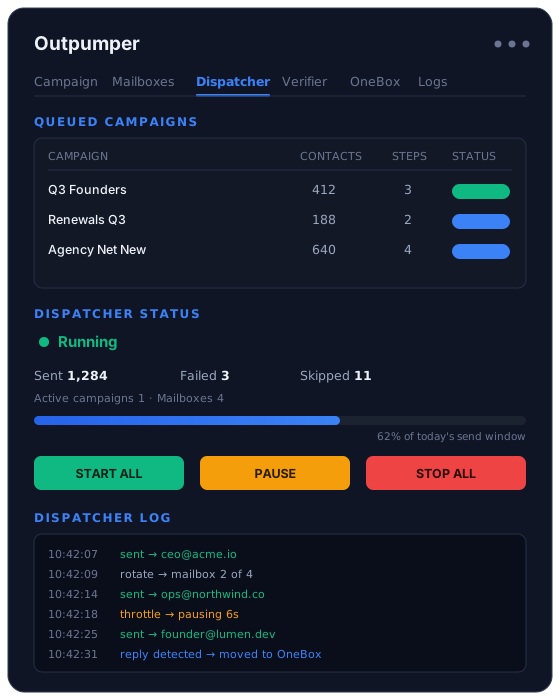
Queue campaigns, dispatch them, watch sends, replies and bounces in real time, all from a panel in your Outlook ribbon. No separate app, no dashboard to log into, and nothing leaves your Microsoft 365 tenant.
The essentials
Everything cold email needs, inside Outlook.
No external app to learn, no separate sending infrastructure to manage. OutPumper adds the full outbound engine to the inbox you already work in.
Multi-step sequences
Follow-ups that run on autopilot, with per-contact tracking so you always know where every prospect stands.
Smart throttling
Sends in natural waves and slows down as needed. An automatic stop keeps you clear of Microsoft's limits.
Mailbox rotation
Detects your user and shared mailboxes and rotates across them automatically. Shared mailboxes are free in M365.
Word variation
Rewrites each email so no two are identical, which keeps pattern-matching spam filters from flagging your sends.
Built-in verification
Every address is verified before it is sent to. Unlimited, included, with no per-check fee.
Bounce intelligence
A bounced address is blacklisted across every campaign automatically, so your sends get cleaner over time.
What it replaces
Tools other senders pay for, included.
Email verification
Built into the sending engine. Verify ten addresses or ten million for the same price.
Warmup tools and extra domains
Send on day one from real Microsoft 365 mailboxes. No warmup service to subscribe to, no 30 to 50 throwaway domains to buy.
Bounce list hygiene
Auto-blacklisting across all campaigns, past and future. No manual cleanup, no re-uploading cleaned lists.
Why warmup backfires
The warmup you paid for is the pattern they flag.
Tools that warm dozens of throwaway mailboxes in shared pools leave a footprint inbox providers have learned to spot. A mailbox you already own carries real history no warmup can fake.
How it works
Three steps to your first campaign.
Install the Outlook add-in
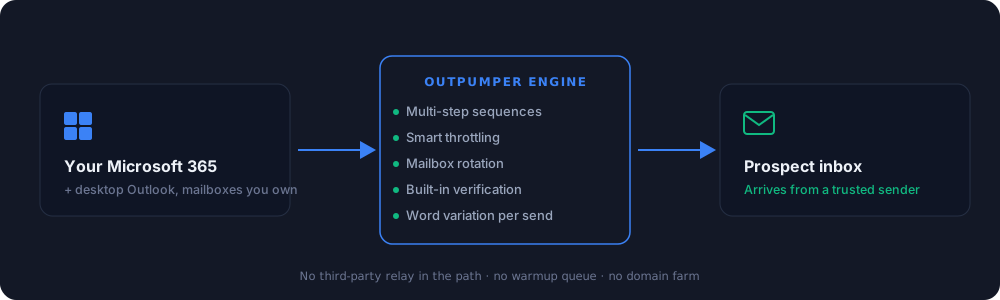
Download, install, and OutPumper appears in your Outlook ribbon. Microsoft 365 plus desktop Outlook is all you need.
Drop in your list
Import a CSV with any columns. No mapping wizard, no long setup. Your contacts are ready to send.
Send from Outlook
OutPumper sends through your own Microsoft 365 mailboxes, throttled and rotated automatically, and tracks every reply in a live dashboard.
Stop renting someone else's sending reputation.
Your Outlook already does the hard part. OutPumper unlocks the rest. Try it free for seven days.
Questions
Straight answers.
Do I need Microsoft 365?
Yes. OutPumper is an Outlook add-in. If you have desktop Outlook connected to a Microsoft 365 account, you are ready to go. That is the only requirement.
Will this get my account banned?
OutPumper is built around Microsoft's sending limits. It throttles automatically, sends in natural waves, and stops before you approach a limit, so your account stays in good standing.
How is this different from Instantly?
Instantly and Smartlead push you to buy 30 to 50 throwaway domains, spin up hundreds of mailboxes, and warm them for weeks, the very pattern Google, Yahoo and Microsoft now flag. OutPumper sends through a couple of real Microsoft 365 Outlook mailboxes you already trust, so you send on day one and ride Microsoft's deliverability.
Can I connect external providers?
Yes. Connect Google Workspace, SendGrid, Mailgun, Amazon SES, or any standard SMTP server, and manage all of it from one dashboard inside Outlook.
Is there a trial?
The Pro and Agency plans include a 7-day free trial. We collect a card up front but charge nothing during the trial. Cancel before day seven and you pay nothing. The Lifetime plan is a one-time purchase and does not include a trial.
What is the refund policy?
Thirty days, no questions asked. If OutPumper is not right for you, you get every cent back.